
If you’re hunting for the best ecommerce platform for small business, you’ll quickly find that all roads seem to lead to Shopify. There's a good reason for that. It's a powerhouse, an all-in-one solution built for entrepreneurs who’d rather spend their time building a brand than wrestling with code.
So, Why Does Everyone Recommend Shopify?
Instead of comparing a dozen platforms, this guide is diving deep into the Shopify ecosystem. We're focusing on the specific features that crush the technical hurdles small business owners face every day. Its clean design, rock-solid infrastructure, and integrated tools give you a straight shot at launching and scaling your store.
Let's unpack how Shopify handles the tough stuff—from payment gateways to inventory headaches—making it the go-to partner for your business.
Shopify’s sheer size is a massive advantage for any small business jumping in. The platform holds a staggering 29% market share in the United States, powering something like 3 million online stores in the country. That huge user base means you're getting a stable, constantly evolving environment backed by a giant network of developers and marketing experts.
Key Advantages for Entrepreneurs
Shopify’s magic is in its blend of simplicity and raw power, a combination that speaks directly to new and growing businesses.
Here are the biggest wins:
- You Don't Need to Be a Coder: Seriously. The drag-and-drop editor and intuitive dashboard make setting up a great-looking, functional store a surprisingly simple process. For example, a jewelry maker can launch a beautiful, mobile-ready store in an afternoon without writing a single line of code.
- Built-in Payment Processing: Shopify Payments comes standard, letting you accept credit cards right out of the box. No need to mess around with complicated third-party gateways. A new coffee brand can start accepting payments the same day they launch their site.
- It Grows With You: Whether you're celebrating your first sale or dealing with a thousand orders on Black Friday, Shopify’s infrastructure won’t buckle under pressure. It's built to scale seamlessly.
- An App for Everything: With thousands of apps in its ecosystem, you can add virtually any feature you can dream up—from sophisticated analytics to essential fraud prevention tools like Fraud Falcon.
Of course, doing your homework is always smart. To get the full picture, it’s worth checking out broader market comparisons to see the top picks for the best ecommerce platform for small business.
Shopify Features That Drive Small Business Growth
At its core, Shopify's big appeal is a powerful set of features that are actually easy to use, all designed to get you selling—fast. These aren't just bullet points on a pricing page; they're real-world solutions to the daily headaches small businesses face, from building a store to managing sales across a bunch of different channels.

The whole platform is built to do the heavy lifting for you. That way, you can focus on what really matters: your products and your customers. Let's dig into the key features that make Shopify such a growth engine for small businesses.
Intuitive Drag-and-Drop Store Builder
One of the biggest roadblocks for any new business is getting a professional-looking website without hiring a developer. Shopify’s drag-and-drop editor completely solves this. It makes store design visual and intuitive. You can add, remove, and shuffle sections around on your homepage and product pages without ever touching a line of code.
Think about it: a new apparel brand could launch a sleek, mobile-friendly storefront in a single afternoon. They can pick a theme, upload their logo, drag in a photo gallery for their latest collection, and pop in a few customer testimonials to build instant trust. This whole process takes hours, not weeks, which is a massive win when you're trying to get to market quickly.
This ease of use also means you're in the driver's seat. Need to add a last-minute banner for a flash sale? It’s a simple drag-and-drop. You have full control over your store's look and feel.
Integrated Payments and Checkout
Making it easy for people to pay you is non-negotiable if you want to make sales. Shopify Payments is baked right into the platform, letting you accept all major credit cards the second you go live. No more hassling with applications for a third-party merchant account, which can be a slow, painful process.
The streamlined checkout is another huge plus. Shopify's checkout is fine-tuned for speed and security, cutting down on friction that makes customers abandon their carts. It comes with features like Shop Pay, which lets returning customers check out with a single click—a feature that’s been shown to boost conversion rates by up to 18% on mobile devices.
Practical Example: An artisan selling handmade jewelry can switch on Shopify Payments in minutes. When a customer buys something, the entire transaction—from payment to order confirmation—is handled smoothly within the Shopify ecosystem. This builds trust and makes for a great customer experience.
Automated Sales and Marketing Tools
Shopify gives you tools to sell smarter and win back sales you might have otherwise lost. One of the most powerful is the built-in abandoned cart recovery feature, which comes with every plan. This tool automatically emails customers who add items to their cart but don't finish checking out.
This simple automation is a game-changer for a busy entrepreneur. For example, a small business selling specialty coffee can set up a quick email to remind a customer about the beans they left behind, maybe even tossing in a small discount to nudge them over the finish line. It’s a simple way to recapture sales that would have vanished.
On top of that, Shopify’s multi-channel selling capabilities are a must for modern retail. To really grow your brand, you need to reach customers where they hang out. Shopify lets you connect your store to platforms like Instagram and Facebook, creating shoppable feeds where people can buy directly from your posts. To get the most out of this, you'll want to explore the best Top Social Media Marketing Tools for Small Businesses.
Centralized Multi-Channel Management
Selling everywhere your customers are is a smart growth strategy, but it can be a logistical nightmare. Shopify excels here by pulling all your sales channels into one dashboard. Whether you sell online, on social media, or face-to-face, your inventory, orders, and customer data are all synced up in real-time.
Imagine a business with an online store that also sells at local weekend markets. With Shopify POS (Point of Sale), they can use a tablet or smartphone to ring up sales right there.
Here’s a practical example of how that works:
- Synced Inventory: When a t-shirt sells at the market, the inventory is instantly updated online. This stops you from accidentally selling an out-of-stock product to an online customer.
- Unified Customer Profiles: A new customer from the market gets added to the same database as your online shoppers, so you can include them both in your email marketing.
- Centralized Reporting: All sales data—online and in-person—flows into the same analytics dashboard. This gives you a complete, 360-degree view of your business performance.
This unified approach prevents inventory headaches and gives you the hard data you need to make smart decisions. It’s one of the biggest reasons Shopify is often the best ecommerce platform for a growing small business.
How To Choose The Right Shopify Plan
Picking the right Shopify subscription is easily one of the most important decisions you'll make when you're just starting out. It has a direct line to your monthly budget, the features you can actually use, and even your long-term profitability. You need a plan that supports your growth, not one that holds you back or costs more than it should.
This isn’t just about the monthly sticker price. Think of it as a strategic choice based on where your business is right now—your sales volume, how complex your operations are, and where you're headed. We'll break down the real-world differences between Shopify's main plans—Basic, Shopify, and Advanced—to help you nail the perfect fit.
The chart below gives you a bird's-eye view, comparing some key Shopify metrics. It’s a great way to see how the plans balance fees and features.
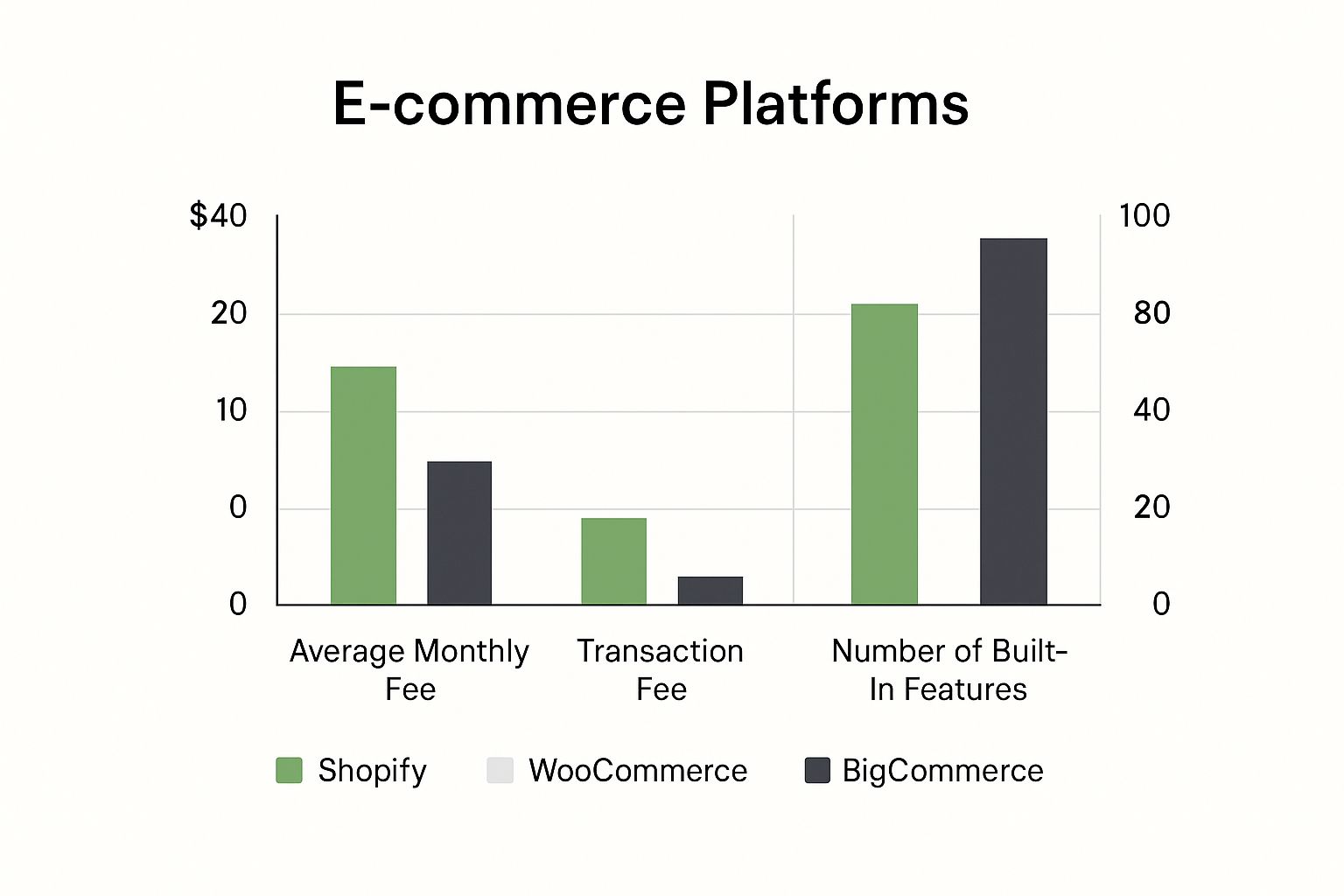
This helps put things in perspective, showing where Shopify stands in the market when you look at the whole picture of costs and built-in tools.
Basic Shopify: The Perfect Launchpad
The Basic Shopify plan is tailor-made for startups and anyone just dipping their toes into e-commerce. It gives you all the essentials to build a real, fully functional online store, take orders, and actually start selling. It's the go-to choice when you're testing out a new idea or your sales are still in the early stages.
Practical Example: You're starting a custom t-shirt business out of your garage. The Basic plan is perfect. You get a professional-looking storefront, integrated payments, and even key tools like abandoned cart recovery, all without a massive monthly bill. It keeps your overhead low while you figure out what works.
Shopify Plan: The Growth Engine
The Shopify plan is the most popular for good reason—it’s built for businesses that are starting to see real traction. The biggest difference here is the lower transaction fees. Yes, the monthly fee is higher, but there's a clear tipping point where upgrading actually starts saving you money.
That breakeven point is usually around $16,500 in monthly revenue. Once your sales are consistently hitting that mark, the savings from the lower transaction fees on the Shopify plan will more than cover the higher monthly cost.
If you’ve found your market and are pulling in consistent sales month after month, this is your sweet spot. You also unlock more detailed professional reporting, which gives you much deeper insights into who's buying and what's selling. Having that data is critical for making smart decisions. A solid financial forecast is part of that, and you can learn more about creating an effective annual operating plan to guide your strategy.
Advanced Shopify: For Scaling and Automation
The Advanced Shopify plan is for businesses that are really taking off and need more powerful tools to keep up. This plan offers the lowest transaction fees on the platform and rolls out features designed for high order volumes and tricky logistics.
One of the best features here is third-party calculated shipping rates. This lets you show real-time shipping costs from carriers like UPS and FedEx right at checkout. It's a game-changer for improving conversions and stopping you from losing money on shipping.
Practical Example: A store selling fragile, heavy, or oddly shaped pottery. Trying to manually figure out shipping for every order would be a nightmare. The Advanced plan automates it all by pulling live rates from carriers, making sure customers pay the right amount and your fulfillment process runs smoothly.
Shopify Plan Comparison for Small Businesses
To make it even clearer, here’s a quick side-by-side look at what you get with each plan.
| Feature | Basic Shopify Plan | Shopify Plan | Advanced Shopify Plan |
|---|---|---|---|
Ideal For | New businesses and startups launching their first store. | Growing businesses with consistent monthly sales. | High-volume stores needing advanced shipping and reporting. |
Transaction Fee | Higher (e.g., 2.9% + 30¢) | Lower (e.g., 2.6% + 30¢) | Lowest (e.g., 2.4% + 30¢) |
Staff Accounts | Up to 2 | Up to 5 | Up to 15 |
Reporting | Basic Reports | Professional Reports | Advanced Report Builder |
Shipping | Shopify Shipping Discounts | Shopify Shipping Discounts | Third-Party Calculated Shipping Rates |
Ultimately, what makes Shopify a great choice for small businesses is its clear growth path. You can start small and lean on the Basic plan, then confidently level up as your revenue climbs. This way, you always have the right tools at the right price for whatever stage you're at.
Tapping into the Shopify App Store to Customize Your Business
A Shopify store is powerful right out of the box, but its real magic is unlocked in the Shopify App Store. This is where you transform a standard template into a business engine perfectly tuned to your specific needs. It's what makes Shopify one of the best ecommerce platforms for small business owners who need to adapt quickly without a developer on speed dial.
The ecosystem is massive, with thousands of apps designed to solve specific problems, from marketing automation to complex inventory management. This lets you build a tech stack that grows with you, adding new capabilities only when you need them.
This level of customization is non-negotiable in today's crowded market. The ecommerce world is on track to host over 28 million online stores globally by 2025, and Shopify already powers around 4.6 million active websites. While Shopify commands an impressive 29% market share in the U.S., its real success comes from letting businesses stand out and operate smarter through its app-driven model.
Building Social Proof With Customer Reviews
For a new business, building trust is your first and biggest hurdle. Customers are naturally skeptical of brands they don't know. This is where customer review apps become one of your most critical early investments, providing the social proof that gets people to click "buy."
An app like Loox, for instance, helps you automatically collect photo and video reviews from customers right after they purchase. Instead of just a star rating, potential buyers see real people using and loving your products.
Practical Example: A small business selling custom phone cases installs Loox. After a customer gets their order, an automated email offers a 10% discount on their next purchase for a photo review. These authentic images are then showcased in a gallery on product pages, boosting conversion rates by showing new visitors that others trust the product.
Automating and Personalizing Email Marketing
Email marketing is still a beast for driving repeat business, but generic email blasts just don't work anymore. To really connect with customers, you need personalization and automation. That's where apps like Klaviyo shine.
Klaviyo integrates deeply with your Shopify data, letting you create laser-focused email campaigns based on actual customer behavior. You can segment customers by what they've bought, how much they've spent, or even what products they looked at but didn't buy.
This allows you to set up some seriously powerful automated email flows:
- Welcome Series: Nurture new subscribers with a series of emails telling your brand story and offering a first-time purchase discount.
- Post-Purchase Follow-up: Send targeted emails with care instructions, related products, or a simple request for a review.
- Customer Win-back Campaigns: Automatically reach out to customers who haven't bought in a while with a special offer to bring them back.
Creating Recurring Revenue With Subscriptions
One of the most powerful business models is recurring revenue. Apps like Recharge make it incredibly simple to offer product subscriptions directly from your Shopify store, turning one-time buyers into loyal, long-term customers.
This is a game-changer for businesses selling consumable products. Instead of just hoping customers remember to reorder, you can offer them the convenience of automatic deliveries.
Practical Example: A small-batch coffee roaster uses Recharge to offer a "Coffee Club" subscription. Customers pick their favorite blend and delivery schedule (e.g., every two or four weeks). This creates a predictable and stable monthly revenue stream, which makes inventory forecasting and financial planning so much easier.
The subscription model builds incredible loyalty and dramatically increases a customer's lifetime value.
Enhancing Security and Preventing Fraud
As your store grows, it unfortunately becomes a bigger target for fraudulent orders and chargebacks. Manually reviewing every single order is a huge time-sink and you’re bound to make mistakes. A dedicated security app becomes absolutely essential for protecting your bottom line.
Fraud prevention tools are a key part of the Shopify ecosystem, designed to automate the detection of sketchy orders. For example, a quality Shopify security app can automatically flag or even cancel high-risk orders based on rules you set, like mismatched billing and shipping addresses or unusual purchase patterns.
This proactive defense saves you from the massive financial and administrative headache of chargebacks. By adding this layer of protection, you can focus on getting legitimate orders out the door with confidence.
Real-World Examples Of Small Businesses Using Shopify
Features and stats are one thing, but seeing how real entrepreneurs use Shopify is where it really clicks. Let's look at a few practical examples of how different small businesses are using Shopify's ecosystem to build, run, and grow their brands from the ground up.
These stories aren't just hypotheticals—they show how specific apps and built-in tools solve very real problems, turning ambitious ideas into profitable businesses. We'll dive into a skincare brand, a subscription service, and a local artist, each with their own unique set of challenges.
The Direct-to-Consumer Skincare Brand
Picture "Glow Getter," a new skincare brand started by a solo esthetician. The biggest challenge right out of the gate was huge: how do you compete with massive beauty brands while managing inventory that can sell out in hours thanks to a viral TikTok video?
Shopify was the perfect fit. The founder used Shopify's built-in inventory management to get low-stock alerts, which was a lifesaver for preventing overselling during those sudden demand spikes. When a product blew up on social media, she could see stock levels in real-time and decide whether to keep running ads or pull back.
To build trust and get those crucial first sales, Glow Getter used the Loox app to pull in photo reviews from customers. This added immediate social proof right on the product pages, showing real people with real results. For new visitors on the fence, that was often the final nudge they needed to click "buy."
The Curated Subscription Box Service
Next up is "Book & Brew," a monthly subscription box for book lovers. Their entire business hinges on recurring revenue and flawless automated billing—a massive logistical headache for a small team. Imagine trying to manually track payments and shipments for hundreds of subscribers. It’s a non-starter.
This is where the Shopify App Store became their secret weapon. The founders installed Recharge, one of the top subscription management apps. Just like that, their entire billing cycle was automated. Customer cards were charged on the same day every month, no human intervention needed.
This single move freed up the team to focus on what actually grew their brand—sourcing unique books and amazing coffees. The app even gave subscribers their own portal to skip a month or update an address, which massively cut down on customer service emails and kept people subscribed longer.
The predictable revenue from the subscription model gave them the stability to grow. They knew exactly how much cash was coming in each month, which made planning inventory buys and marketing spend so much easier. Many entrepreneurs are finding success with this model; you can discover more by exploring different business ideas for stay at home moms and similar ventures.
The Local Artist Selling Custom Prints
Finally, let's look at a local artist selling her custom art prints. She had two big hurdles: first, offering a bunch of different print sizes without having to buy and store tons of expensive physical stock. Second, protecting her digital artwork from being stolen or used without her permission.
She found her answer by plugging a print-on-demand (POD) service like Printful directly into her Shopify store. This app connected her shop to a printing facility. When someone ordered a print, the order was automatically sent to Printful, which then printed, packed, and shipped it straight to the customer.
The print-on-demand model meant she had zero upfront inventory costs. She could offer dozens of designs in all sorts of sizes and frames, turning her Shopify store into a digital gallery where she only paid for a product after she made a sale.
To protect her artwork, she used an app to add digital watermarks to her images and disable the right-click "save" function. It was a simple, effective layer of security that let her focus on creating new art instead of worrying about theft.
Each of these examples gets to the heart of what makes Shopify so powerful: it gives you a rock-solid foundation that you can completely customize with specialized apps to fit almost any business model you can dream up.
Shopify: The Clear Choice for Small Business Owners

To really get why Shopify is so often the go-to for small businesses, it helps to understand its core philosophy. This isn't about comparing platforms in a vacuum; it’s about recognizing which ecosystem aligns with what you need as a business owner right now.
Think of Shopify as a fully-hosted, all-in-one solution. Everything you need is already in the box: hosting, security, payment processing, and support. It's built for one thing—getting you selling fast, so you can focus on your products, not the technical plumbing behind your store.
Other platforms, particularly self-hosted options, give you an incredible amount of freedom and customization, but they also mean you’re the one in charge of all the technical stuff. You have to find your own hosting, keep everything secure, and manage all the updates yourself.
A Focus on Selling, Not Server Management
Shopify's approach is built on a clear trade-off: it provides a managed environment where the technology is handled for you in exchange for a monthly fee. This is a strategic advantage for most small businesses.
For the vast majority of small business owners, the goal is to sell products, not become a part-time web developer. Shopify's managed ecosystem is the superior choice for focusing on growth rather than troubleshooting server issues or applying security patches.
This philosophy is why Shopify has become such a dominant force. Globally, the ecommerce market is vast, with many different types of platforms available. You can find more insights about the global ecommerce platform market to see the full picture, but for small businesses prioritizing ease-of-use and reliability, the Shopify ecosystem offers the clearest path to success.
Frequently Asked Questions
Jumping into the world of ecommerce always stirs up a few questions, especially when you're trying to pin down the best ecommerce platform for a small business. Here are some of the most common things we hear from business owners who are getting started with Shopify.
Can I Use My Own Domain Name With Shopify?
Yes, and you absolutely should. Your domain name is a huge part of your brand, and Shopify makes it easy to use your own.
If you’ve already got a domain from a registrar like GoDaddy or Namecheap, you can connect it to your Shopify store in just a couple of clicks. If you're starting from scratch, you can buy a domain right through Shopify, which keeps everything managed in one convenient place.
How Does Shopify Handle Shipping?
This is one of the areas where Shopify really shines for small businesses. They have a built-in feature called Shopify Shipping that gives you access to some seriously good discounts from major carriers like USPS, UPS, and DHL Express.
Practical Example: You run a small candle business—you can weigh a package, print a discounted shipping label directly from your Shopify dashboard, and even schedule a carrier pickup without leaving your desk. It’s a huge time-saver.
And as you grow, Shopify plays nice with tons of third-party shipping and fulfillment apps, so your logistics can scale right along with your orders.
Is Shopify Good For SEO?
Shopify gives you a solid SEO foundation right out of the box. All the basics are there—you can easily edit your meta titles, descriptions, and image alt text. The platform also automatically creates a sitemap for you, which helps Google understand your store's structure.
But the real power comes from the Shopify App Store. It’s loaded with incredible SEO apps that can help you with the more advanced stuff, like fixing technical issues or finding the right keywords to target. For example, an app can walk you through optimizing your product descriptions so you start ranking for what your customers are actually searching for, bringing in more organic traffic.
Ready to protect your new Shopify store from the headache of chargebacks? Fraud Falcon automates your fraud prevention, letting you set custom rules to instantly block sketchy orders. Stop losing money and start growing with confidence.
Start your free trial of Fraud Falcon today.