Features
Everything FraudFalcon does, on every plan
Block risky buyers at checkout. Cancel, hold, or tag risky orders after they arrive. Plans differ only in how many orders they cover, so the Free plan has every feature too.
Two checkpoints
How it works
Checkout rules run before the order exists. Order rules run the moment Shopify creates it. Three example orders, three outcomes.
Before the order
Checkout blocking
Checkout rules stop a buyer before the order exists. No payment is captured, no stock moves, and there is nothing to refund later.
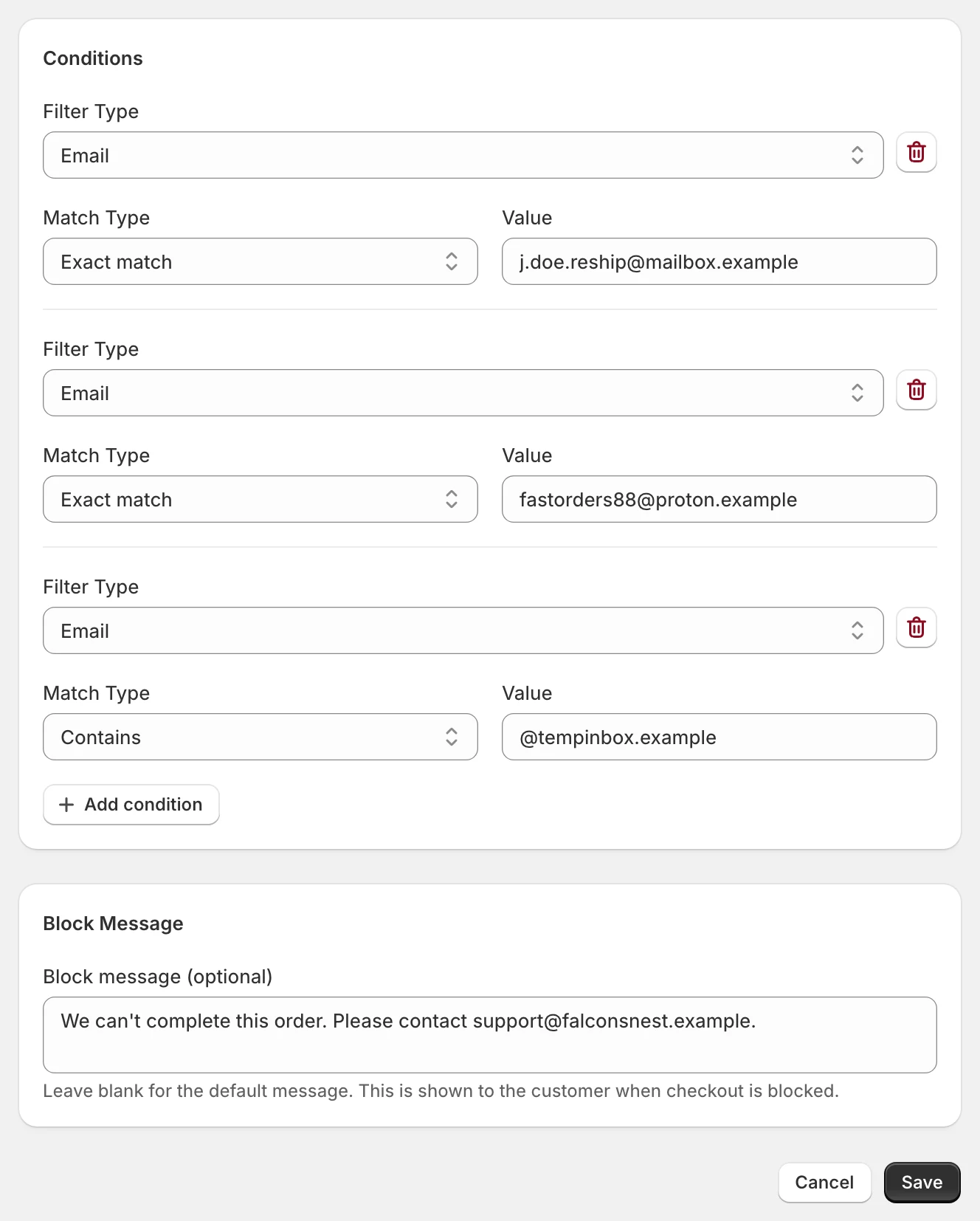
Block a checkout on six conditions
Email, shipping country, order total, total item quantity, whether the customer is logged in, and how many orders the customer placed before.
Your own block message
Write what the buyer sees for each rule. Leave it blank and they see a neutral message that asks them to contact the store.
Match all or any
A rule can need every condition to match, or just one. The first matching rule blocks the checkout.
Any gateway, any Shopify plan
Checkout rules run as a Shopify Function, so they work on Basic and on Plus, with Shopify Payments or another gateway.
After the order
Order rules
Order rules read every new order the moment it arrives and act on the ones that match. They see much more than the checkout can.
35+ conditions
Customer, billing and shipping address, order contents, IP address, Shopify's own risk assessment, and more. The full list is further down this page.
Shopify risk, at the level you choose
Act on high risk only, or on medium and above. If Shopify's risk check is not finished when the order arrives, the rule runs again once it is.
Customer history
Count a customer's past orders over 24 hours, 7 days, 30 days, a year, or all time. Count their past chargebacks and inquiries too.
Fraud signals Shopify does not show
Disposable email domains, billing and shipping address mismatch that ignores 'St' versus 'Street', and the same name used by other customers in your store.
Shopify Protect aware
Act only on orders Shopify Protect does not cover, so free cover and your rules never overlap.
Sales channel
Limit a rule to the Online Store, POS, draft orders, marketplaces, or a subscription app. Look up an order number to find its channel.
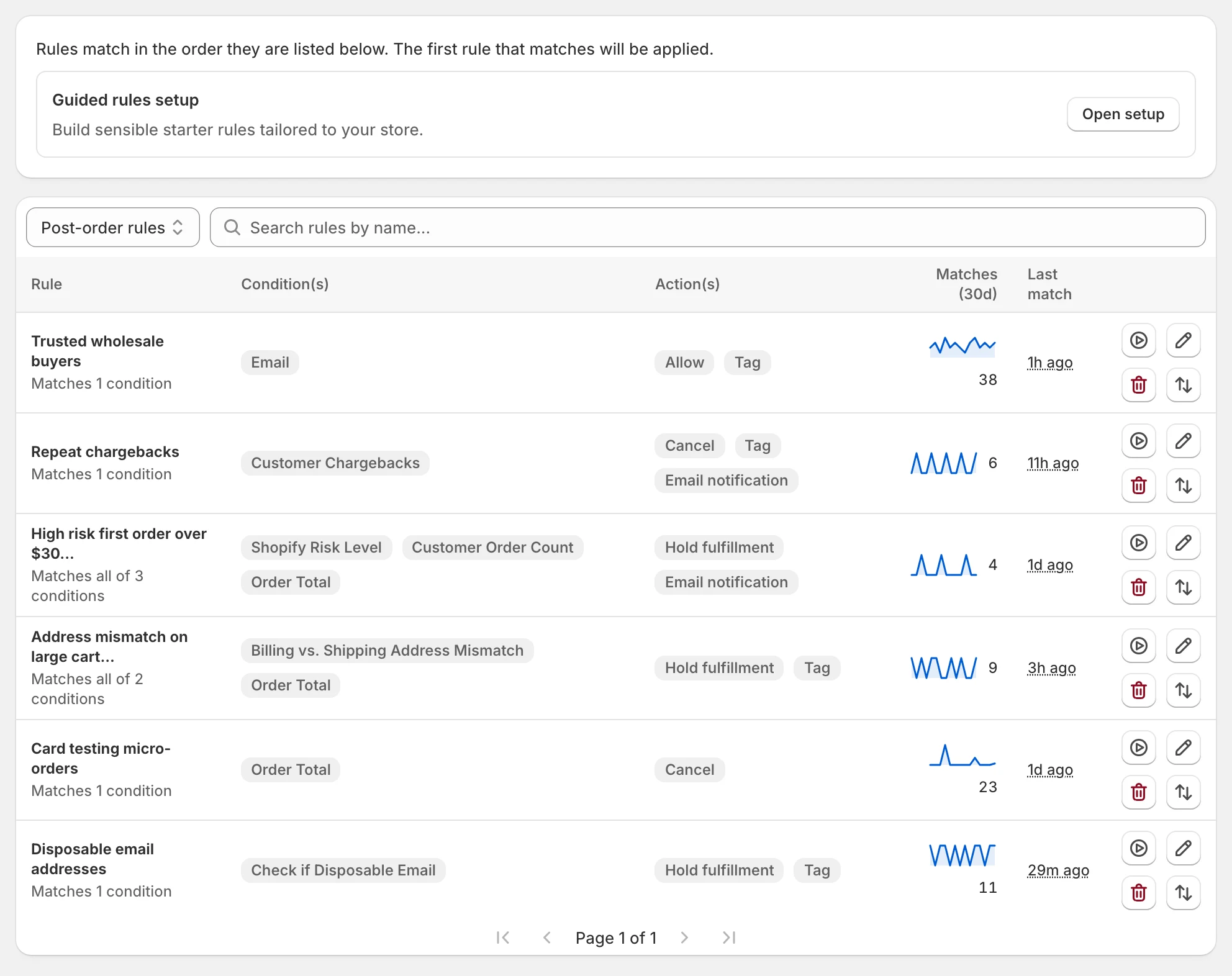
Match all or any, in priority order
Combine conditions with AND or OR. Move rules up and down. The first rule that matches an order is the one that acts.
Create a rule from an order
A link on the Shopify order page opens a new rule with that order's details filled in. Build your first rule from a real chargeback.
On a match
Actions
Each order rule has one main action, plus optional tags and an email alert. The work is done for you, not added to your queue.
Cancel, with refund and restock
Cancel the order as fraud. Tick refund, restock, and customer email to choose exactly what happens next.
Hold fulfillment
Put every fulfillment on hold with the reason 'high risk of fraud' and the rule name as the note, so nothing ships until you check it.
Allow
Mark trusted orders as safe. An allow rule stops lower rules from acting on the order, and can still tag it or email you.
Tag the order
Add up to five tags per rule. Set default tags for every rule or per action, so your team and other apps can filter on them.
Email alert
Email up to six people when a rule matches. Each recipient confirms once and can unsubscribe in one click.
Pause everything with one switch
Stop every action and every checkout block at once. Rules keep checking orders and logging matches while paused.
Inside Shopify
Shopify Flow and admin
FraudFalcon fits into the tools you already use in Shopify.
Shopify Flow trigger
'FraudFalcon rule executed' starts a Flow workflow with the order and the actions that ran. Send a Slack message, update a spreadsheet, or anything else Flow can do.
Block on the order page
Each order page in the Shopify admin shows which rule matched and what happened to each action.
Support from the admin
Chat with us inside the app, or from 'Get support' in the Shopify admin.
See what it did
Analytics and orders
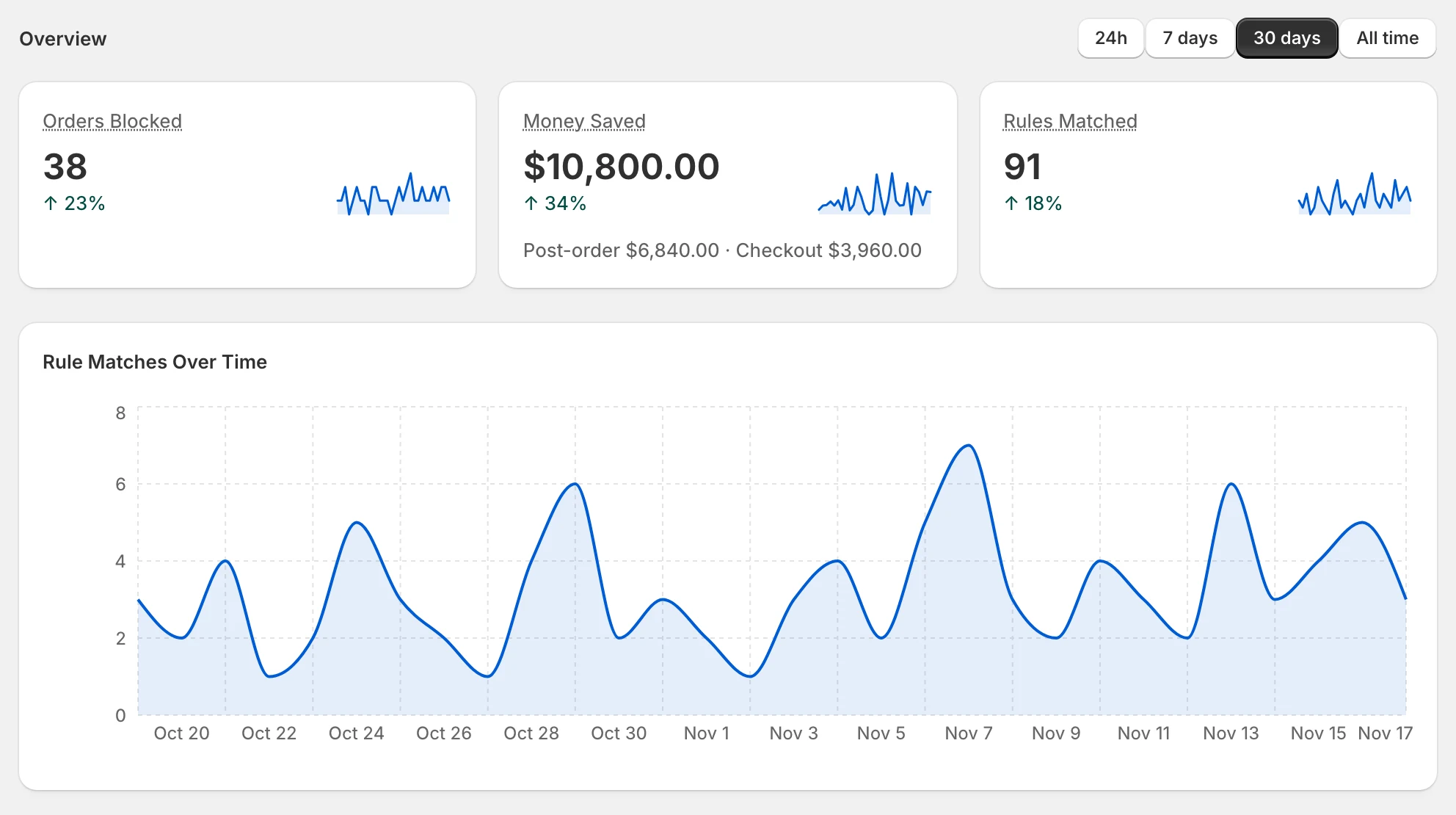
See what your rules stopped and what that was worth, for the last day, week, month, or all time.
Money saved and orders blocked
Value saved, split between order rules and checkout rules, plus orders blocked and rules matched over time.
Top rules and actions
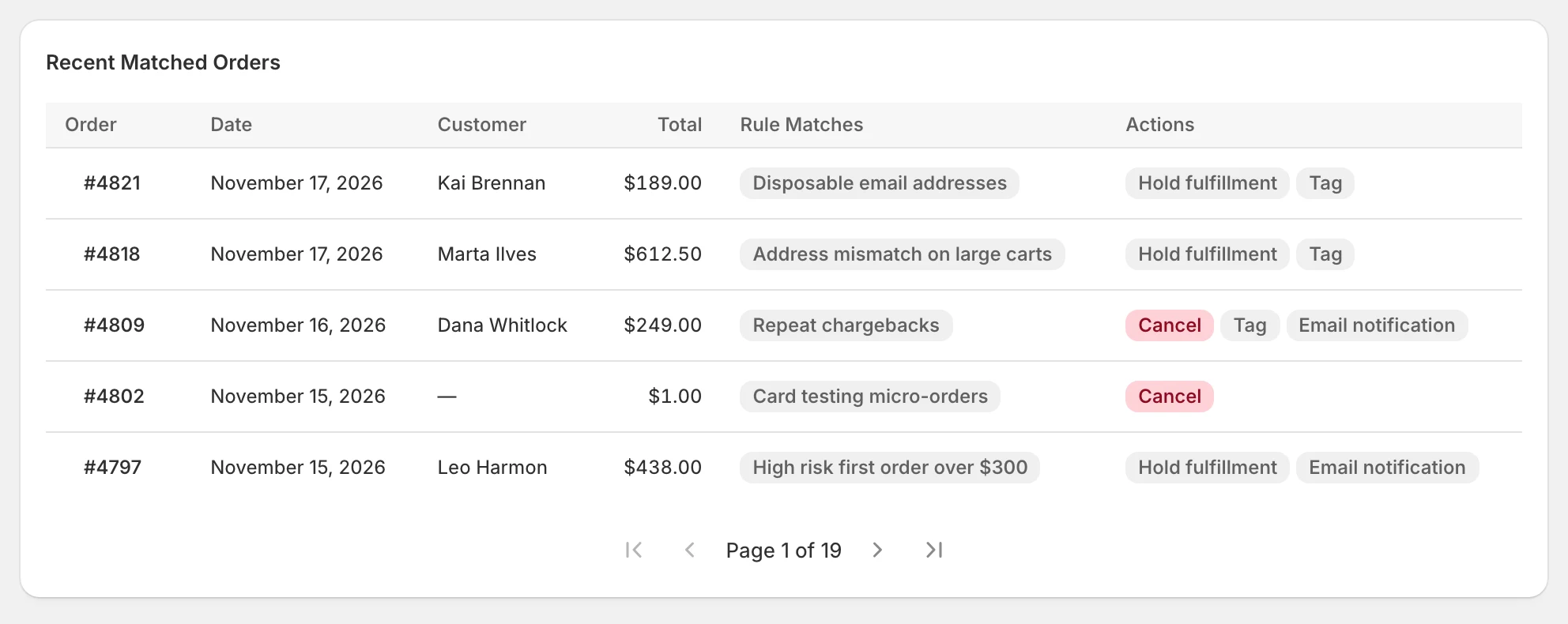
Which rules match most, what they did, and the most recent matched orders.
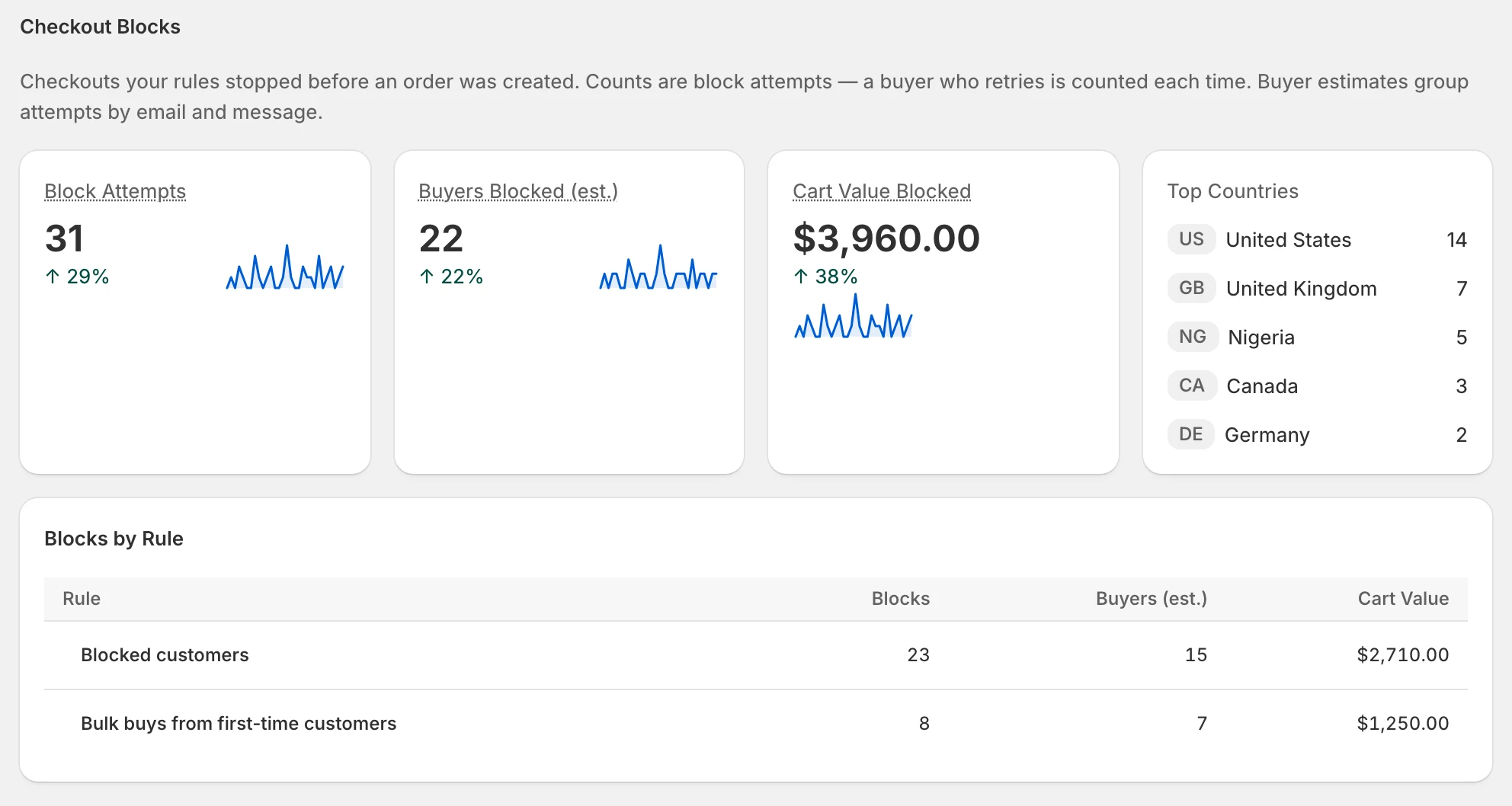
Checkout block analytics
Block attempts, cart value blocked, blocks per rule, and top countries. Turn it on with one optional permission in the app.
Every order, with its result
The orders page shows each order with the rule that matched and its status. Search by order number or customer.
Disputes to rules
Past disputes appear on the home page with a one-click button to build a rule from each. Disputes need Shopify Payments.
Without logging in
Reports by email
FraudFalcon tells you what happened, so you do not have to check.
Weekly fraud summary
A short weekly email with what your rules caught. It is skipped when there is nothing to report.
Fraud your rules missed
A daily email lists orders cancelled for fraud that no rule caught, each with a link to build the rule that would have.
Plan limit warnings
Banners in the app at 80% and 100% of your monthly orders, and an email if your checkout rules stop because you passed the limit.
First rule in minutes
Setup and testing
The first rule should be live in minutes, not after a week of reading docs.
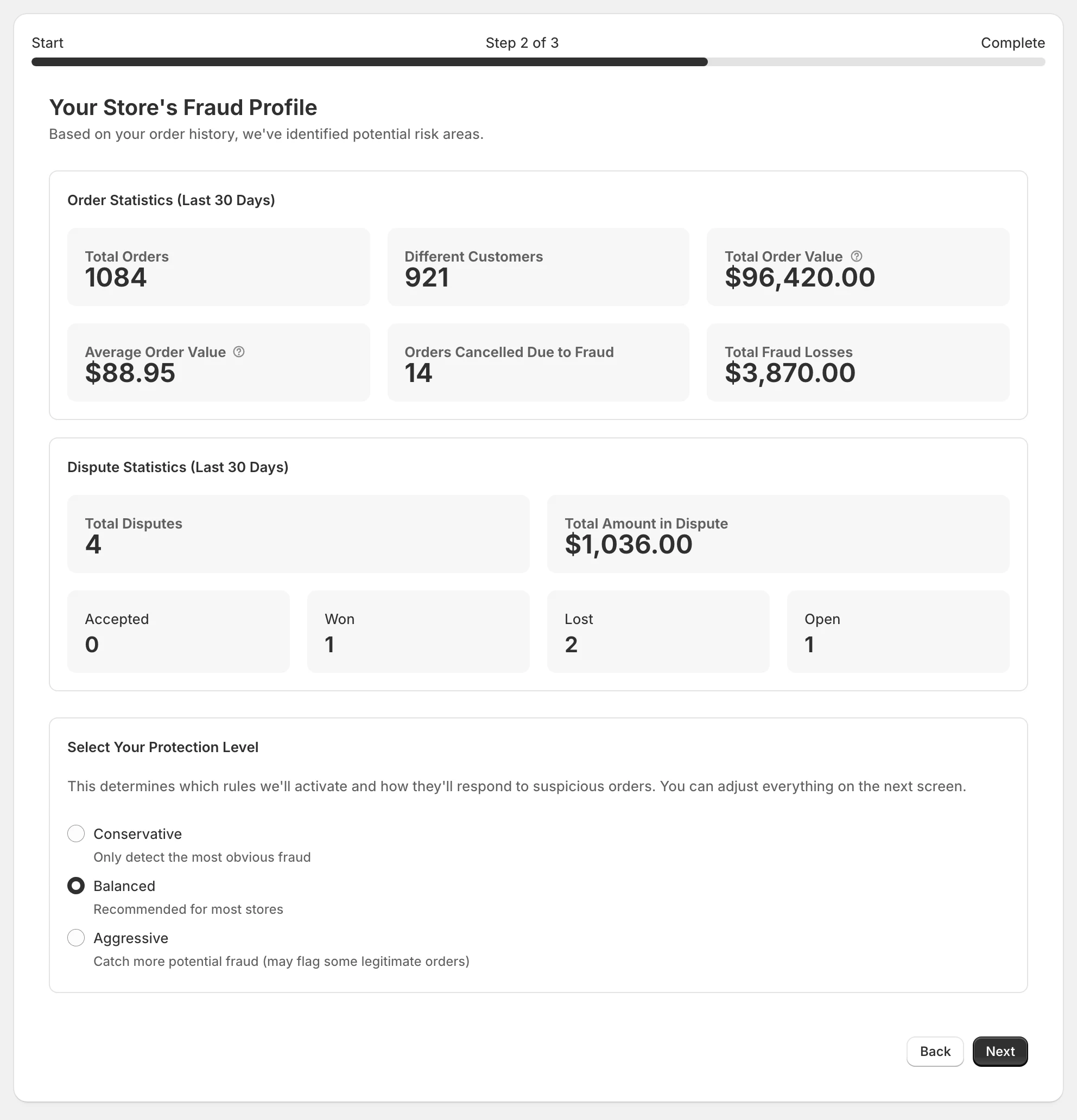
Guided setup
See your last 30 days of orders and disputes, pick a cautious, balanced, or strict starting point, and switch on the suggested rules you want.
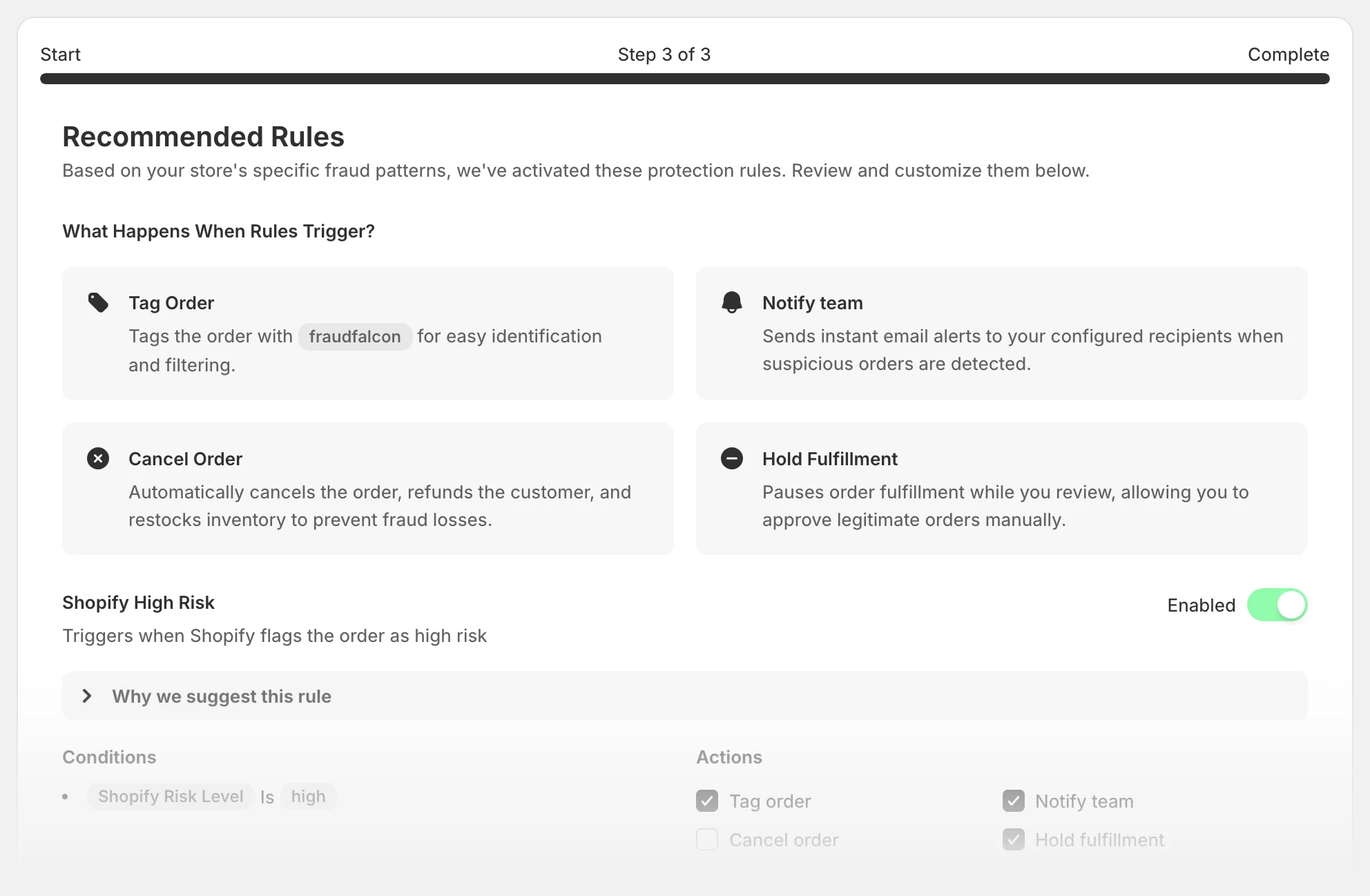
Recommended rules
Ready-made rules for Shopify high risk, address mismatch, disposable email, and micro-orders used for card testing.
Test orders
Create a real Shopify test order from a rule and watch it run. Test orders send no emails and do not count toward your plan.
Seven languages
The app follows your Shopify admin language: English, German, French, Spanish, Italian, Brazilian Portuguese, and Dutch.
Copy these
Example rules
The rules from the screenshots above, written out. Each one is a few clicks in the app.
Blocked customers
Checkout rule- If any
- Email is j.doe.reship@mailbox.exampleEmail contains @tempinbox.example
- Then
- Block the checkoutShow your own message
Bulk buys from first-time customers
Checkout rule- If all
- Customer order count is 0Total item quantity is over 10
- Then
- Block the checkout
Repeat chargebacks
Order rule- If all
- Customer chargebacks is 1 or more
- Then
- Cancel, refund and restockTag chargeback-historyEmail alert
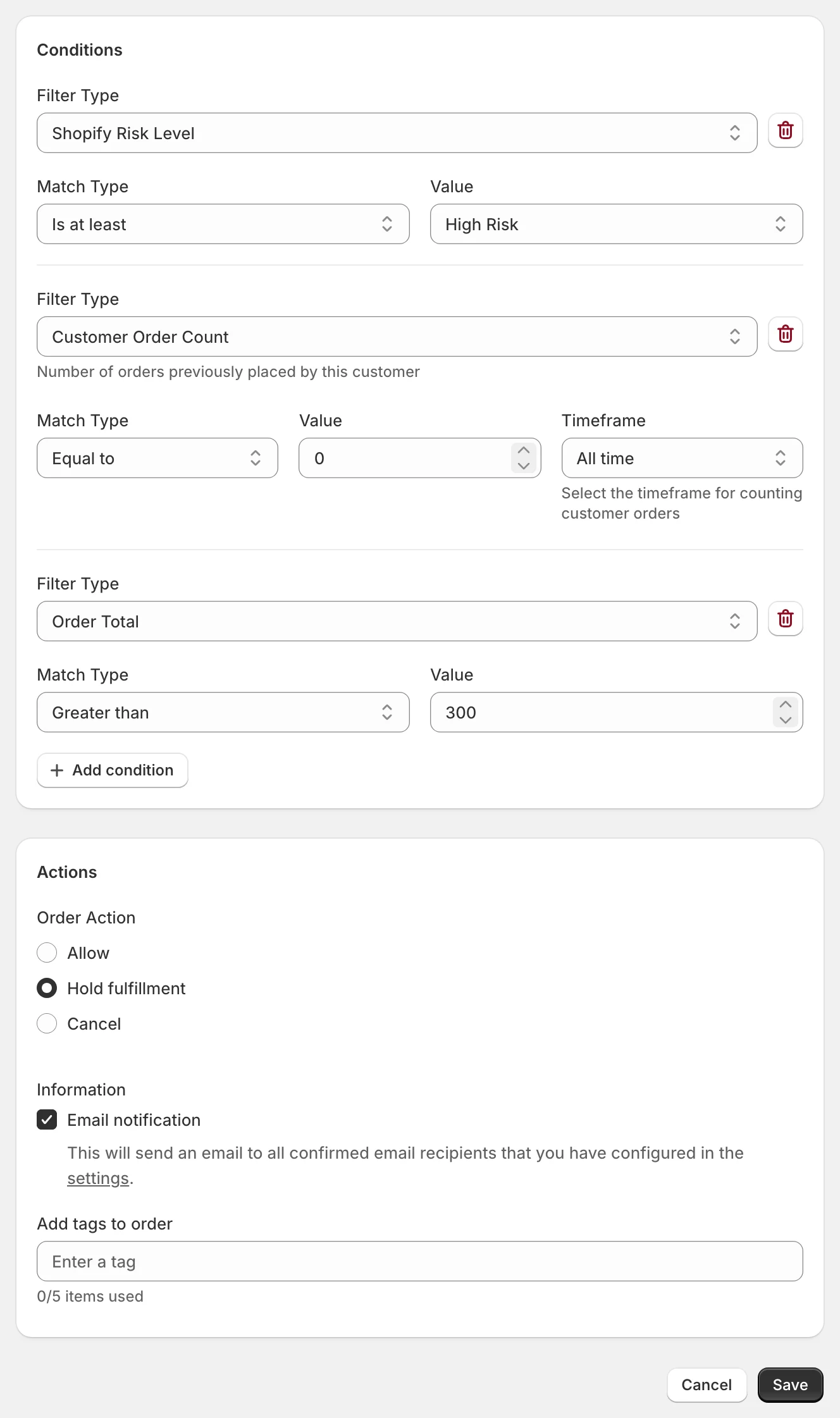
High risk first order over $300
Order rule- If all
- Shopify risk is at least highCustomer order count is 0Order total is over $300
- Then
- Hold fulfillmentEmail alert
Address mismatch on large carts
Order rule- If all
- Billing and shipping address differOrder total is over $400
- Then
- Hold fulfillmentTag review
Card testing micro-orders
Order rule- If all
- Order total is under $2
- Then
- Cancel, refund and restock
Disposable email addresses
Order rule- If all
- Email uses a disposable domain
- Then
- Hold fulfillmentTag disposable-email
Trusted wholesale buyers
Order rule- If all
- Email contains @northwind-wholesale.com
- Then
- Allow, so no rule below actsTag vip
Reference
All conditions
40 conditions for order rules and 6 for checkout rules.
Checkout rules
Email · Customer Authenticated · Customer Order Count · Shipping Address - Country · Order Total · Total Item Quantity
Customer 7
- Phone Number
- Customer Name
- Customer Order Count
- Customer Chargebacks
- Customer Fraud Cancellations
- Check if Disposable Email
Billing Address 12
- City
- Country
- Province/State
- Postal Code
- Address Line 1
- Address Line 2
- Company
- First Name
- Last Name
- Full Name
- Phone
- Province Code
Shipping Address 12
- City
- Country
- Province/State
- Postal Code
- Address Line 1
- Address Line 2
- Company
- First Name
- Last Name
- Full Name
- Phone
- Province Code
Order 4
- Order Total
- Total Item Quantity
- Individual Item Quantity
- Sales Channel
Browser Detail 1
- IP Address
Risk Assessment 3
- Shopify Risk Level
- Billing vs. Shipping Address Mismatch
- Shopify Protect Eligibility
Cross-Customer Detection 1
- Customer Name Used by Other Customers
Pricing
Plans
Every plan has every feature. Plans differ only in how many orders they cover each 30 days. Paid plans start with a 14-day free trial and are billed through Shopify.
Free
$0
10 orders
Starter
$29.99 / month
500 orders
Advanced
$49.99 / month
1,000 orders
Professional
$149.99 / month
5,000 orders
Business
$399.99 / month
20,000 orders
Every order counts toward the limit, matched or not. Past the limit, rules keep checking and logging orders but stop acting until you upgrade or the next period starts.
Ready to protect your store?
FraudFalcon helps you prevent fraud and reduce chargebacks. Start protecting your business today.
Free for 10 orders a month · first rule live in minutes