
Shopify has no button that blocks an IP address. There is no setting, no toggle, and no native blocklist for it. That is the honest answer, and it is why the top Google results for this question are mostly forum threads from merchants who could not find one either.
The second thing worth knowing is that "block an IP" means two different jobs, and mixing them up is why so much advice fails.
This guide covers how to find the real IP behind an order, how to build a rule that acts on it, when an IP rule is the right tool, and the stable identifiers you should almost always block instead.
The Two Things "Block an IP" Can Mean
Before you install anything, work out which problem you actually have. The tools are different.
Blocking a visitor stops someone loading your storefront at all. They never see a product page. This happens at the network or theme layer, before Shopify's checkout is involved.
Blocking an order lets the person browse, but stops the order going through, or cancels and holds it the moment it arrives. This happens at checkout or just after the order is created.
Most merchants searching for an IP blocker want the second one. They had a fraudulent order, they found an IP on it, and they want that person to stop ordering. Almost every article on this topic answers the first question instead, which is why the advice so often does not work.
| What you want | Where it happens | What you need |
|---|---|---|
Stop someone browsing your store | Before Shopify | Cloudflare or similar proxy in front of your domain |
Stop someone browsing (lighter) | Storefront app | A storefront blocking app that runs in the theme |
Stop the checkout completing | Checkout, pre-order | Shopify Fraud Control checkout rules, or a checkout-time rules app |
Cancel or hold the order automatically | Just after the order is created | A post-order rules engine such as FraudFalcon, or Shopify Flow |
Review it yourself | Manual | Shopify's fraud analysis, then cancel by hand |
The rest of this guide focuses on order-level blocking, because that is where an IP address is actually available to you and where it does the most good.
Step 1: Find the Order's Real IP Address
Shopify does record the IP used to place an order. It is not on the main order screen, which is why so many people conclude it does not exist.
- In your Shopify admin, go to Orders and open the order.
- Scroll to the Fraud analysis card.
- Click View full analysis.
- The IP address used to place the order is listed in the analysis details.
That is the address you want. It belongs to the session that placed the order.
The Wrong IP Everyone Gets Told to Use
Search for how to find a customer's IP on Shopify and several of the top results will tell you to go to Settings → Domains → DNS settings and read the A record, which shows 23.227.38.65.
That is not a customer IP. It is Shopify's own storefront address, and it is identical for every Shopify store on the platform. It tells you nothing about the person who ordered from you, and blocking it would achieve nothing except confusion.
If a guide sends you to your DNS settings to find a fraudster, close it.
What You Cannot Get
You cannot get the IP address of a visitor who did not order. Shopify does not expose visitor IPs in analytics, and Liquid has no access to the requesting IP. If you need visitor-level IP data you need a proxy in front of your store or a storefront app that collects it, which is a different setup with different trade-offs.
You also will not find an IP on orders created in ways that bypass the online store, such as draft orders or point of sale.
Step 2: Decide Whether IP Is the Right Thing to Block
This is the step everyone skips, and it is the one that decides whether your rule does anything.
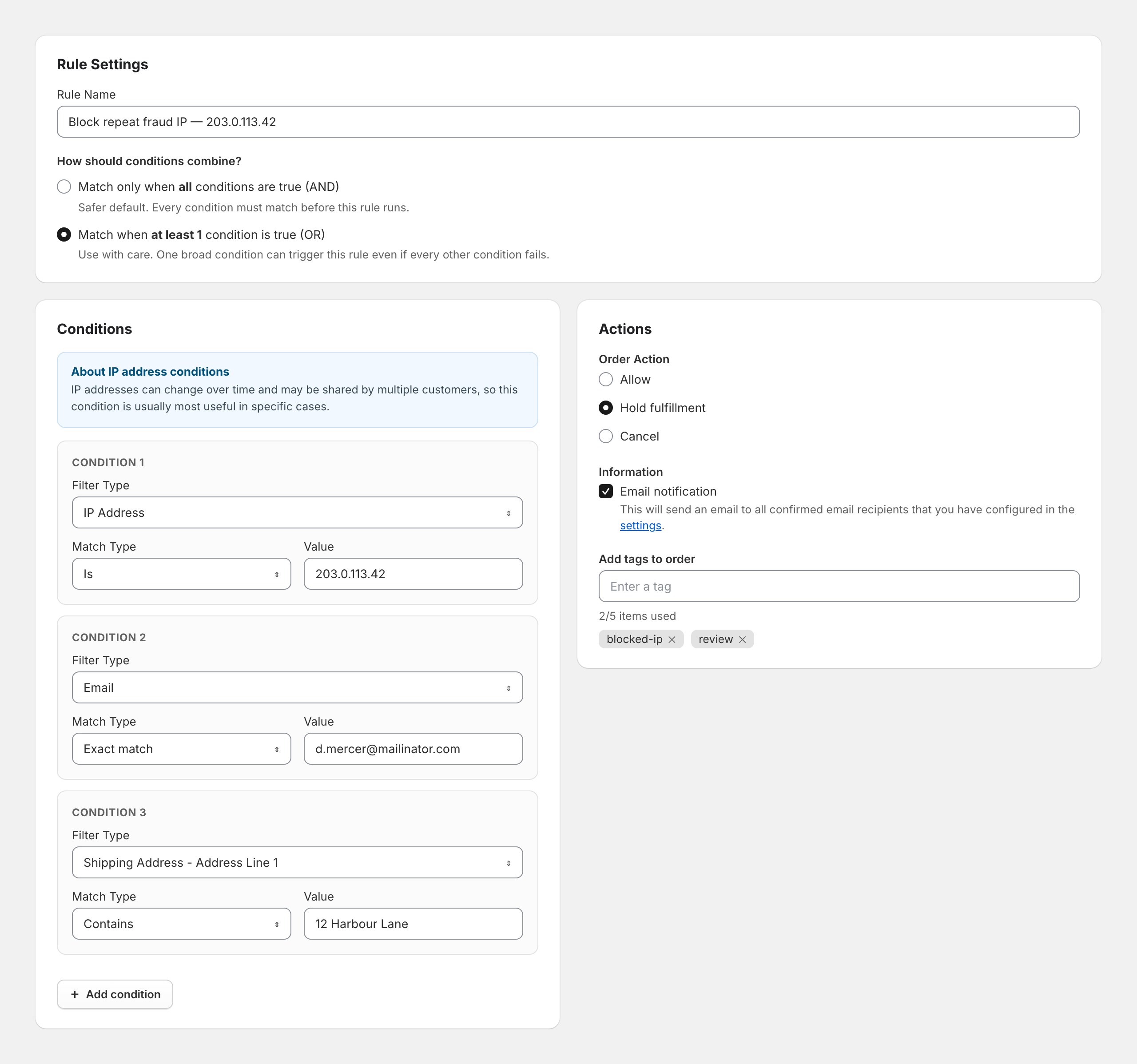
An IP address is the weakest identifier you can block. FraudFalcon shows a warning about this directly in the rule builder, above the conditions:
IP addresses can change over time and may be shared by multiple customers, so this condition is usually most useful in specific cases.
Three things make IP unreliable:
Addresses rotate. Most home broadband and virtually all mobile networks hand out dynamic addresses. The person who defrauded you on Tuesday may have a different address on Wednesday without doing anything deliberate.
Addresses are shared. Carrier-grade NAT means thousands of mobile customers can share one public address. University networks, offices, and apartment buildings do the same. Block one and you may block a hundred people who have never heard of you.
Evading it is trivial. A VPN, a proxy, or switching from wifi to mobile data gives a determined fraudster a fresh IP in seconds. Anyone running an organised attack already rotates addresses by default.
So when is an IP rule worth it? Three cases:
- Repeat abuse from the same address. You have seen three or more bad orders from one IP over days or weeks. That suggests a fixed connection, and a rule will keep catching them.
- As one condition among several. The IP is not the trigger, it is one signal that combines with others.
- As a temporary measure during an active attack, while you put something more durable in place.
If you have seen the address exactly once, an IP rule is probably not worth building. Block the email and the shipping address instead, and read on.
Step 3: Build the Rule
Here is how to block orders from an IP address using a FraudFalcon rule. The same logic maps onto any post-order rules engine.
- Open FraudFalcon from your Shopify admin.
- Go to Rules and click Add new rule.
- Give the rule a name you will still understand in six months.
Block repeat fraud IP — 203.0.113.42beatsRule 4. - Under Conditions, set Filter Type to IP Address.
- Set Match Type to Is and paste the address into Value.
- Under Actions, choose your Order Action.
- Save.
The screenshot at the top of this guide shows exactly this rule with two extra conditions layered on, which is the part worth copying.
Choose the Right Action
You get three order actions, and the choice matters more than the condition does.
| Action | What happens | Use it when |
|---|---|---|
Allow | The order passes and lower-priority rules stop running | You want an exception, not a block |
Hold fulfillment | The order is created but fulfillment is blocked until you release it | You are not certain. This is the safe default |
Cancel | The order is cancelled, optionally refunded and restocked | You are certain, and a false positive is acceptable |
For an IP rule specifically, start with Hold fulfillment. Because IP addresses are shared, an IP rule has a genuinely higher false-positive rate than a rule matching on email or address. Holding gives you a chance to look before a real customer gets cancelled on. Switch to Cancel only once you have watched the rule for a week and seen it catch nothing but fraud.
Tick Email notification so you find out when the rule fires, and add a tag such as blocked-ip. Tags cost nothing and make the orders searchable later.
Add the Conditions That Actually Hold
Set How should conditions combine? to Match when at least 1 condition is true (OR), then add the identifiers that do not rotate:
- Email — exact match on the address they used
- Shipping Address - Address Line 1 — contains the street line
- Phone Number — exact match
- Customer Name — the name on the order
Now the rule catches them whether or not the IP changed. The IP becomes one of several nets rather than the only one.
Be careful with OR. FraudFalcon will warn you about this, and the warning is worth reading: with OR, a single broad condition fires the whole rule on its own. Shipping Address - Address Line 1 contains "High Street" would hold a very large number of perfectly good orders in the UK. Keep every condition in an OR rule specific enough to identify one person.
If you would rather build this from a real order than fill in fields by hand, our guide on creating a fraud rule from an order walks through doing it from the order page in a couple of clicks.
Step 4: Block at Checkout Instead, Where You Can
A post-order rule cancels or holds an order that already exists. That is useful, but the order still consumed inventory for a moment, still created a customer record, and still shows in your numbers.
Blocking at checkout is cleaner. The buyer cannot complete the purchase, and no order is created at all.
You have two options.
Shopify Fraud Control checkout rules are built in. Go to Apps → Fraud Control → Checkout rules and create a rule. They can match on email addresses, address attributes, and IP addresses. They are available on all plans, but they require Shopify Payments — if you use another gateway, this option is not available to you. Blocked buyers see an error and the attempt lands in your abandoned checkouts.
FraudFalcon checkout rules work without Shopify Payments, but they see a smaller set of fields. Because a checkout rule runs before the order exists, it only has cart and buyer data available: email, whether the customer is logged in, customer order count, shipping country, order total, and total item quantity. IP address is not available at checkout time. Neither is Shopify's risk level, because Shopify has not scored the order yet.
That last point is the trade-off in one sentence. Checkout rules stop the order ever existing but cannot see an IP. Post-order rules see the IP but only act after the fact. If IP is genuinely your signal, you are working post-order.
What Blocking an IP Will Not Fix
Being clear about the limits saves you from expecting too much:
- It does not remove existing orders. Rules apply to orders created after you save them. Cancel the ones you already have by hand.
- It does not stop someone browsing. They can still load your store, add to cart, and reach checkout.
- It does not survive a VPN. One click on their side and your rule matches nothing.
- It does not stop a distributed attack. Card-testing bots run from hundreds of addresses. Blocking them one at a time is a losing race — see our guide on Shopify card testing attacks for what does work.
- It does not stop chargebacks on orders already fulfilled. That money is already at risk.
Block These Instead
If you take one thing from this guide, take this: the IP is rarely the useful part of the order. These are the identifiers that hold up.
Email address. Still the strongest single signal for a repeat offender who is not being careful. Match exactly on the address, or use contains on a domain if a whole disposable-email provider is the problem. FraudFalcon also has a dedicated Check if Disposable Email condition that catches throwaway providers without you maintaining a list.
Shipping address. Goods have to physically arrive somewhere. A fraudster can rotate emails and IPs endlessly, but if they want the product they have to give you a real delivery address. This is the most under-used blocking signal there is.
Phone number. Harder to churn than email, easier than an address.
Cross-customer signals. FraudFalcon's Customer Name Used by Other Customers condition checks how many other customer records share the exact name on this order. One person cycling through accounts leaves that fingerprint even when every other field changes.
Customer chargebacks. The Customer Chargebacks condition matches on how many past disputes the customer already has. Someone who has charged back before is the clearest risk signal you will get, and it needs no manual list at all.
Behaviour, not identity. Rules on order total, item quantity, billing and shipping mismatch, or Shopify's own risk level catch people you have never seen before. Identity-based blocking only ever catches repeats.
For a fuller treatment of which signals to combine, see our guide to blocking fraudulent orders on Shopify and our ecommerce fraud prevention best practices.
Do Not Trust a Liquid Snippet for This
You will find theme snippets claiming to block IPs by dropping code into theme.liquid. They do not work properly, for a simple reason: Liquid has no access to the visitor's IP address. There is no request.ip object.
The snippets get around this by calling an external IP lookup service from the browser with JavaScript, then hiding the page if the returned address is on a list. That means:
- The block runs in the visitor's browser, so anyone can disable JavaScript or read the list in your page source.
- You have leaked your blocklist publicly.
- You are dependent on a third-party lookup service on every page load, which costs you speed.
- Bots ignore it entirely, because they do not run your JavaScript.
If you genuinely need visitor-level blocking, put Cloudflare or a similar proxy in front of your domain and block there, where it happens before the request reaches Shopify. That is real blocking. A theme snippet is a curtain.
Avoid Locking Yourself Out
One practical warning. If you block a range rather than a single address, check your own address is not inside it first. Search "what is my IP" and confirm.
This bites hardest with storefront-level or proxy-level blocking, where you can genuinely lock yourself and your staff out of your own store. Order-level rules are more forgiving — the worst case is that your own test order gets held — but it is still worth thirty seconds of checking.
Frequently Asked Questions
Can you block an IP address on Shopify without an app?
Not for orders. Shopify has no native setting that blocks an IP address from placing an order. The closest native option is a Fraud Control checkout rule, which can match on IP but requires Shopify Payments. Everything else needs an app or a rules engine.
How do I find a customer's IP address on Shopify?
Open the order in your Shopify admin, find the Fraud analysis card, and click View full analysis. The IP address used to place the order is listed there. This is the order's IP, not the customer account's, and it only exists for orders placed through the online store.
Is 23.227.38.65 my customer's IP address?
No. That is Shopify's own storefront IP address and it is the same for every Shopify store. You find it under Settings, Domains, DNS settings. Several guides confuse it with a customer IP. Blocking it would do nothing useful.
Should I block a single IP address or a range?
Usually neither on its own. A single IP stops one person until their address changes, often within hours. A range risks blocking legitimate customers who share the same network or carrier. Block the IP only when you have seen repeat abuse from it, and pair it with a stable identifier such as email or shipping address.
Will blocking an IP address stop someone using a VPN?
No. A VPN or proxy gives the person a different IP immediately, so an IP rule matches nothing. This is the main reason IP is the weakest identifier available to you and should never be your only rule.
Can I block an IP address from visiting my Shopify storefront?
Only with a storefront app or a proxy such as Cloudflare in front of your domain. Liquid cannot read a visitor's IP address, so theme code snippets that claim to do this do not work reliably. Blocking a visitor and blocking an order are two different jobs.
Does blocking an IP address cancel orders that were already placed?
No. A rule only applies to orders created after you save it. Existing orders from that IP still need to be cancelled, refunded, or held manually.
Will blocking IP addresses hurt my SEO?
Not if you block individual addresses or small ranges tied to abuse. It becomes a risk if you block large ranges or whole countries carelessly, since you could block a search engine crawler or a CDN that legitimate traffic shares.
The Short Version
Shopify will not block an IP address for you. You can find the address on the order's fraud analysis, and you can build a rule that holds or cancels future orders from it.
But treat the IP as a hint, not a fence. It rotates, it is shared, and a VPN defeats it. Build the rule around the email, the shipping address, and the customer's chargeback history, then add the IP as one more condition. That rule keeps working after the address changes.
If the same person keeps getting through under new details, the problem is not the IP — it is that you are blocking identity instead of behaviour. Our guide to blocking a customer on Shopify covers that distinction in full, and Shopify fraud analysis explains the risk signals worth building rules around.