
You wake up to ninety-three orders. Every one of them is $1.80. The email addresses look like someone fell asleep on a keyboard. None of them are real customers, and by lunchtime your payment processor has sent you an email you do not like the look of.
That is a card testing attack. Your store is not the target — the cards are. You are just the machine the attacker is using to find out which stolen numbers still work.
This guide covers how to confirm it is happening, what to do in the first hour, and how to block the pattern so it does not come back next week.
What Card Testing Actually Is
Someone buys a batch of stolen card numbers. Most of them are dead — cancelled, expired, already flagged. Before they can be sold on or used for anything expensive, they have to be sorted into working and not working.
Testing them by hand is slow. So the attacker points a script at a real store's checkout and runs the numbers through in bulk. Approved means the card is live and worth money. Declined means bin it.
They pick your store because something about it makes testing cheap:
- A low-priced product. A $1 sticker, a digital download, a sample. Small charges attract less attention and cost the attacker nothing since it is not their money.
- Guest checkout. No account needed, no friction, no history.
- A checkout that responds fast. One-page checkout is a feature for your customers and a feature for a script.
None of that means you did anything wrong. Being an easy testing ground is mostly a matter of having a cheap product and a working checkout.
How to Confirm It Is Card Testing
Several things go wrong on a Shopify store at once and look similar from a distance. These are the signals that specifically mean card testing rather than something else.
A burst, not a trickle. Real traffic arrives spread out. Card testing arrives in tight clusters — dozens of attempts in minutes, then nothing, then another burst. Check the timestamps.
Very small amounts, very consistent. Almost always your cheapest item, at the same price, over and over. If the same $2 product appears forty times overnight, that is not a viral moment.
Throwaway email addresses. Random character strings at disposable domains. Sometimes an obvious pattern like abc123@, abc124@, abc125@.
Failed payments outnumbering successes heavily. This is the clearest tell. Most of the cards being tested are dead, so a healthy attack produces mostly declines. If your payment failure rate has jumped from a few percent to most of your attempts, you are being tested.
Abandoned checkouts piling up. Blocked and failed attempts still create abandoned checkout records. Merchants often notice this before they notice the orders.
Odd hours and mismatched geography. Activity at 3am local time, shipping addresses that do not match the billing country, or a country you do not normally sell to.
Names and addresses that do not resolve. Nonsense names, addresses that fail validation, or the same address behind many different names.
If you are seeing three or more of these together, treat it as card testing and act. For the general case of reading Shopify's own risk signals on an individual order, our guide to Shopify fraud analysis covers the indicators one at a time.
What It Costs You
It is tempting to shrug at a pile of $2 orders. The cost is not in the order values.
Chargebacks on the successful tests. Every card that got approved belongs to a real person who did not authorise it. Weeks later they dispute the charge. You pay a dispute fee whether you win or lose, and you usually lose, because the charge genuinely was not authorised.
Your dispute ratio. This is the one that ends stores. Payment networks care about the ratio of disputes to transactions, not the amount. A batch of small successful tests can push that ratio past the threshold where your processor starts holding funds in reserve, adding verification requirements, or removing your access to Shopify Payments entirely. Our guide on how to prevent chargebacks covers what that threshold means in practice.
Processing fees on every attempt. Failed authorisations are not always free.
Poisoned data. Hundreds of fake sessions wreck your conversion rate, your abandoned-cart flows, and any ad platform learning from your pixel. If you are running paid traffic, the attack is teaching your ad platform to find more people like the bots.
Your time. Cancelling, refunding, and restocking by hand, then explaining it to your processor.
First Hour: Stop the Bleeding
Do these in order. They are all reversible.
1. Switch payment capture to manual
In your Shopify admin, go to Settings → Payments and scroll to Payment capture method. Change it from automatic to manual.
Now an order authorises the card but does not take the money until you capture it. Nothing settles while you are still working out what is happening, and cancelling costs you nothing.
This is the single highest-value thing you can do in the first five minutes, and it is the step most guides leave out.
Remember to switch it back, or set up automation to capture safe orders, once the attack is over. Authorisations expire.
2. Check what Shopify is already doing
Shopify is not leaving you undefended. Shopify says its machine learning model blocks approximately 90 percent of card testing attacks on guest credit card checkouts, and reports that this lifted legitimate approval rates by 13 percent.
That is real protection, and it means two things. Most of the attack is probably already being stopped. And the volume you are seeing is the remainder — which tells you the raw attack is roughly ten times larger than what reached you.
Check Settings → Payments for Shopify's card testing prevention and proxy detection settings, and make sure they are on.
3. Turn off express checkout, temporarily
Wallet buttons and express checkout give a script the shortest possible path to a payment attempt. Disabling them for a day or two raises the attacker's cost.
This costs you real conversions, so it is a tourniquet, not a treatment. Turn them back on once your rules are in place.
4. Cancel and refund the successful tests fast
Any test charge that succeeded is a future chargeback. Refunding it before the cardholder notices turns a dispute into a refund. A refund costs you the processing fee. A dispute costs you the fee, the admin, and a mark against your ratio.
Move quickly on this one. The window is days, not weeks.
Block the Pattern at Checkout
Everything above is triage. This is the fix.
The right place to stop card testing is at checkout, before the order exists. A post-order rule that cancels the order still let the order be created, still touched inventory, and still left the record behind. A checkout rule means no order, no charge, no abandoned checkout attributed to a real attempt.
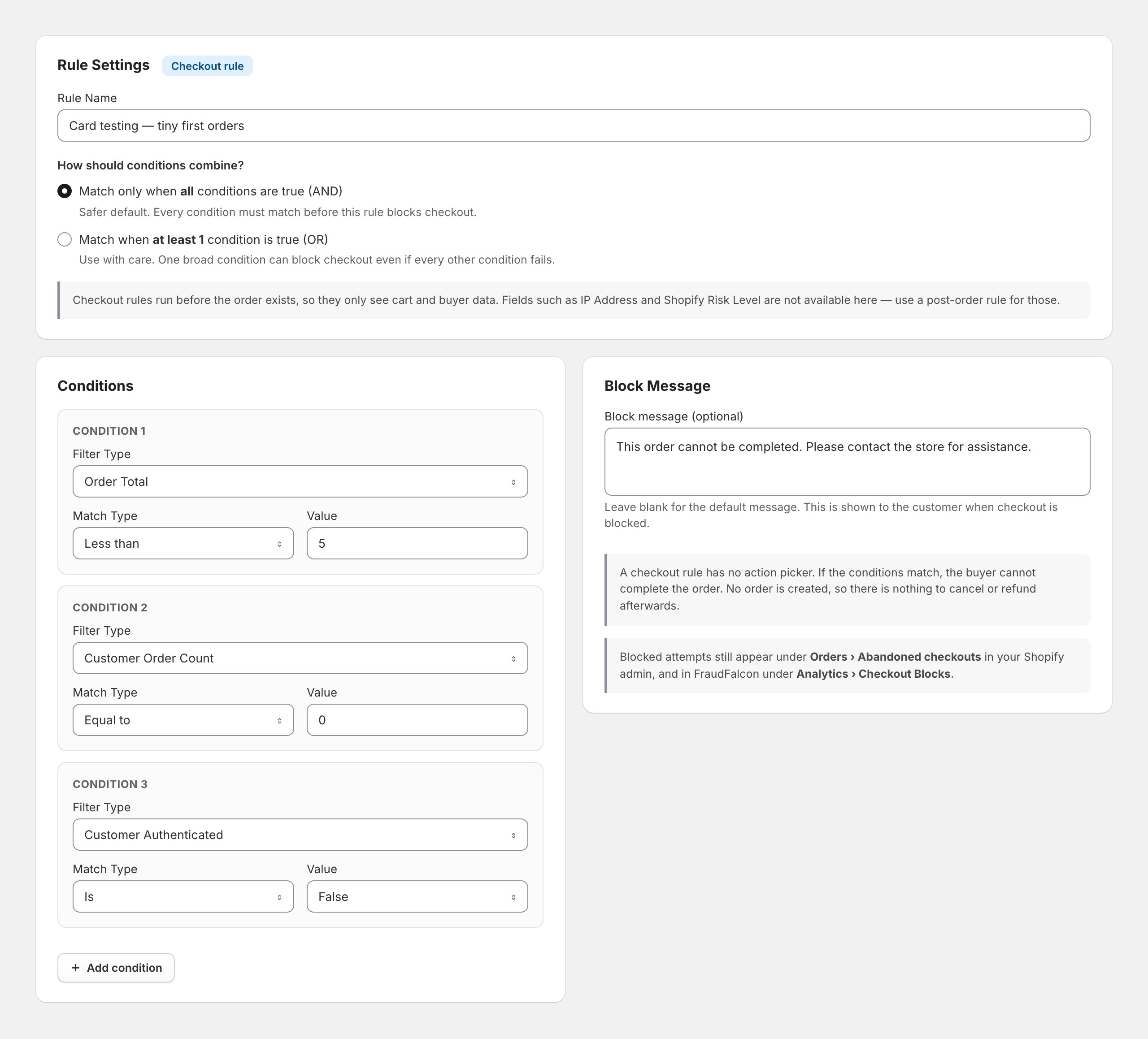
Here is the rule, step by step.
- Open FraudFalcon and go to Rules, then the Checkout tab.
- Click Create checkout rule.
- Name it something specific:
Card testing — tiny first orders. - Set How should conditions combine? to Match only when all conditions are true (AND). This matters enormously — see the warning below.
- Add the three conditions:
- Order Total — Less than —
5 - Customer Order Count — Equal to —
0 - Customer Authenticated — Is —
False
- Order Total — Less than —
- Leave the Block message blank for the default, or write your own.
- Save.
Why Those Three Conditions Together
Each one alone would be a bad rule. Together they describe the attack precisely.
Order total under $5 is the attack's defining feature, but on its own it would block every genuine small purchase you make.
Zero previous orders excludes your returning customers. Someone who has bought from you before and comes back for a cheap item sails through.
Not authenticated means checking out as a guest rather than logged in. Card-testing scripts do not create and verify accounts — the whole point is speed.
A real customer buying a $3 item has usually either ordered before or is logged in. A card-testing bot is none of the three. That is why the AND matters: with OR, the first condition alone would block every small order in your store.
FraudFalcon will warn you if you pick OR with multiple conditions, and on a checkout rule you should take that warning seriously. A blocked checkout is a lost sale you never hear about.
What the Buyer Sees
When the rule matches, the buyer cannot complete the order. They get an error at checkout and the payment is never attempted.
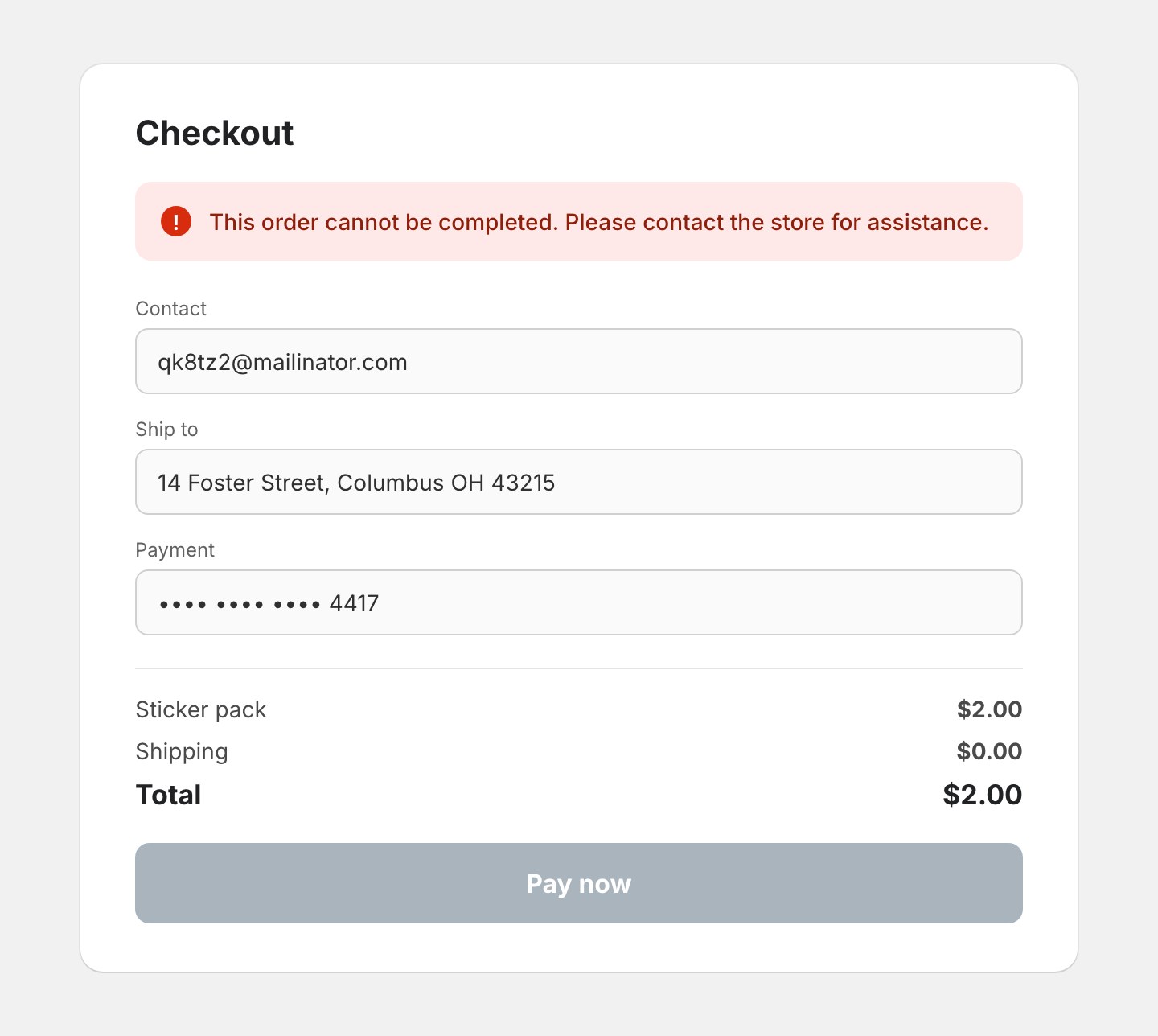
Keep the message vague. Telling the buyer exactly which rule caught them tells an attacker exactly what to change. The default wording is deliberately unhelpful, which is the right instinct here.
Tune the Threshold to Your Store
Do not copy $5 blindly. Look at what the attacker is actually charging and set the threshold just above it. Then check your own order history: if you legitimately sell $4 items to new customers, that threshold is too high for you and you need a different second condition.
What Checkout Rules Cannot See
A checkout rule runs before Shopify has created the order, so it only sees cart and buyer data. Available fields are email, customer authenticated, customer order count, shipping country, order total, and total item quantity.
IP address is not available at checkout. Neither is Shopify's risk level, because the order does not exist to be scored yet. If your signal is one of those, you need a post-order rule instead — our guide to blocking an IP address on Shopify covers that path and its trade-offs.
The Native Alternative
Shopify's own Fraud Control checkout rules also block at checkout and can match on email, address attributes, and IP. They are available on all plans but require Shopify Payments. If you use a different gateway, they are not an option. Find them under Apps → Fraud Control → Checkout rules.
Add a Post-Order Backstop
Checkout rules stop the pattern you have described. A post-order rule catches what got through, because it can see signals that only exist once the order is scored.
Useful conditions for card testing specifically:
- Shopify Risk Level — Is at least — High Risk
- Check if Disposable Email — Is — True, which catches throwaway providers without you maintaining a domain list
- Customer Name Used by Other Customers, which flags one person cycling through customer records
- Order Total combined with Total Item Quantity for the "many units of the cheapest thing" pattern
Set the action to Hold fulfillment rather than Cancel while you are still learning what the rule catches. Holding is reversible; a cancelled order upsets a real customer. Our guide to automatically cancelling high-risk Shopify orders covers that decision properly.
Check That It Worked
Blocking silently is how you end up blocking customers without knowing. Two places to look.
Shopify's abandoned checkouts. Blocked attempts appear under Orders → Abandoned checkouts. During an attack this fills fast, which is annoying but is also your evidence.
FraudFalcon's block analytics under Analytics → Checkout Blocks tells you what your rules stopped and, importantly, which rule stopped it.
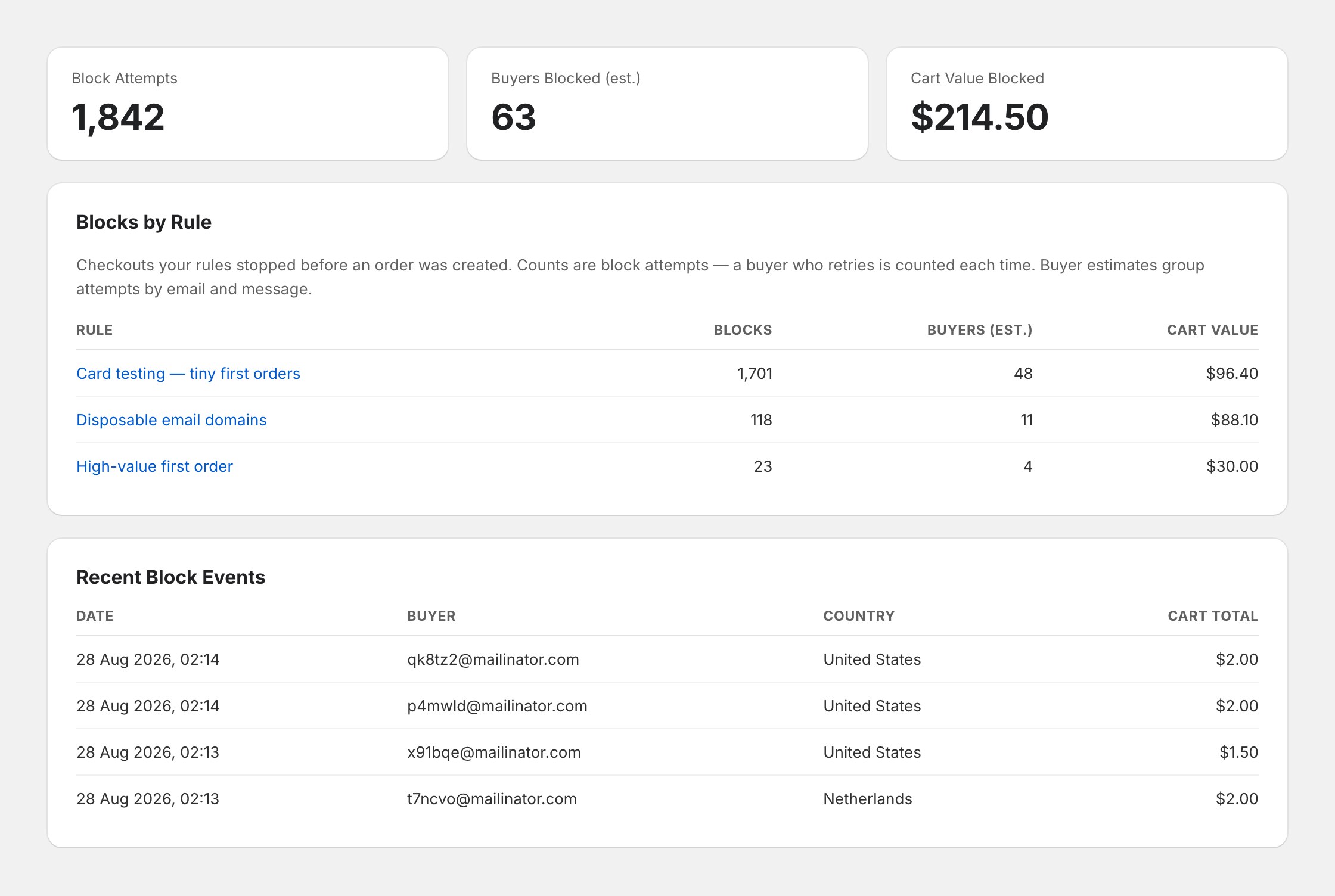
The number to watch is buyers blocked, not block attempts. A single bot retrying two hundred times inflates attempts and tells you nothing. If estimated buyers blocked climbs into a range that looks like real customer numbers for your store, your rule is too broad.
About Those Abandoned Checkouts
This is the complaint merchants raise most often, and it deserves an honest answer: you generally cannot bulk delete them. Shopify does not offer it in the admin, and merchants have been asking for years.
What you can do:
- Filter them out of reporting by date range so your conversion rate is readable again.
- Exclude the attack window when judging campaign performance.
- Make sure your abandoned-cart email flow is not emailing throwaway addresses, which damages your sender reputation. Most email tools let you exclude by cart value or email pattern.
- Block at checkout so no new ones are created.
The existing records will mostly stay. Plan around them rather than fighting them.
Comparing Your Options
| Option | Stops the order? | Needs Shopify Payments? | Sees IP / risk level? | Effort |
|---|---|---|---|---|
Manual payment capture | No, delays settlement | No | n/a | Two clicks |
Shopify's built-in ML protection | Blocks ~90% of guest attempts | Yes | n/a | Already on |
Shopify Fraud Control checkout rules | Yes, pre-order | Yes | IP only | Low |
FraudFalcon checkout rules | Yes, pre-order | No | No | Low |
FraudFalcon post-order rules | No, cancels or holds after | No | Yes | Low |
Shopify Flow | No, acts after the order | No | Risk level | Medium |
Cloudflare or similar proxy | Blocks traffic before Shopify | No | IP only | High |
Turning off express checkout | Slows the attack | No | n/a | Two clicks, costs sales |
Most stores want manual capture immediately, a checkout rule within the hour, and a post-order backstop by the end of the day.
What Not to Do
Do not block by IP alone. Card testing runs from hundreds of rotating addresses. You cannot win that race one address at a time.
Do not block a whole country reflexively. It feels decisive and it is usually too blunt. The attacker moves; your customers in that country do not come back.
Do not delete your cheap product. If a $2 item is genuinely how customers find you, removing it costs more than the attack. Protect it with a rule instead.
Do not leave manual capture on and forget. Authorisations expire. If you leave it on for weeks without capturing, you will lose real money on real orders.
Do not set the rule and never look again. Check the block analytics after a week. A rule that has blocked nothing is not protecting you; a rule blocking hundreds of distinct buyers is costing you.
Frequently Asked Questions
What is a card testing attack on Shopify?
Card testing is fraudsters using your checkout to find out which stolen card numbers still work. They run large numbers of very small transactions, usually on your cheapest product, and keep the cards that get approved. Your store is the testing ground, not the target.
How do I know if my Shopify store is being card tested?
Look for a sudden burst of very small orders or abandoned checkouts, many failed payment attempts in a short window, throwaway email addresses with random characters, the same cheap product repeatedly, and activity clustered at odd hours. A normal store does not produce dozens of two-dollar checkouts in an hour.
Does Shopify block card testing automatically?
Partly. Shopify says its machine learning model blocks approximately 90 percent of card testing attacks on guest credit card checkouts. That leaves a meaningful remainder, and the attempts that are blocked can still flood your abandoned checkouts and distort your analytics.
What should I do first during an active card testing attack?
Switch your payment capture method to manual, under Settings then Payments. That stops money moving automatically while you work. Then add a checkout rule that blocks the pattern the attacker is using, usually very small orders from customers with no order history.
Do card testing attacks cause chargebacks?
Yes, for the small charges that succeed. The real cardholder disputes them days or weeks later, and each dispute carries a fee whether you win or lose. A batch of successful tests can push your dispute ratio toward the level that puts your payment processing at risk.
Can I delete the abandoned checkouts a card testing attack created?
Not in bulk through the Shopify admin, which is the complaint merchants raise most often. You can filter them out of your reporting, and blocking the attack at checkout stops new ones being created, but the existing records generally stay.
Should I turn off express checkout during an attack?
It can help temporarily. Wallet and express checkout buttons give bots a faster path to a payment attempt. Turning them off for a day or two raises the cost of the attack, but it also costs you real conversions, so treat it as a short-term measure rather than a fix.
Will blocking card testing block real customers too?
It can if you set the rule too broadly. A rule that blocks every order under five dollars will block genuine small purchases. Combine the low value with a second condition such as zero previous orders and a guest checkout, so a returning customer buying something cheap still gets through.
The Short Version
Card testing is a burst of tiny orders and failed payments from throwaway emails, usually on your cheapest product. It costs you in chargebacks, dispute ratio, and ruined data rather than in order value.
Switch payment capture to manual first. Then build one checkout rule that matches the pattern precisely — small total, no order history, guest checkout, all three together — and add a post-order rule using disposable email and Shopify's risk level as a backstop.
Then go and look at what your rules blocked after a week. The rule is only doing its job if it is catching bots and letting your customers through.
For the wider picture on automated attacks against Shopify stores, see our guide to Shopify bot protection. If chargebacks from the attack are already landing, how to reduce chargebacks covers what to do next.